
The Knot Wedding Planner
The KnotEvents
4.716.21K Reviews
- Version
- 5.2.6
- Installs
- 1.00M
- Age Rating
- Everyone
Screenshots


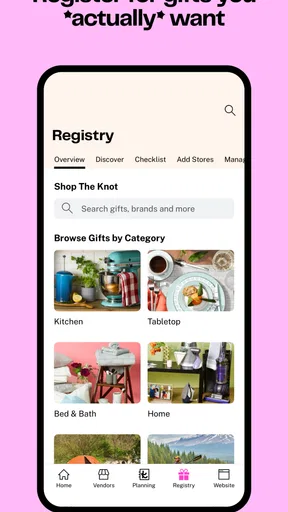
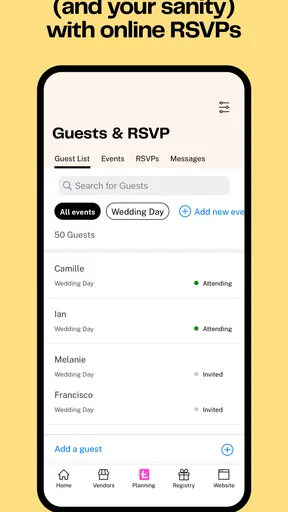
Our Review of The Knot Wedding Planner
 Analysis by Appyee
When I think about what makes a wedding-planning app useful, it isn’t simply having a long feature list. It is having a dependable place to return to when decisions, deadlines, and details begin to pile up. That is the role I would give The Knot Wedding Planner: a free events app from The Knot that brings several planning jobs into one mobile workspace. Its central strength is the way it connects a wedding checklist with practical tasks such as budgeting, finding vendors, and preparing a wedding website.
That combination matters most when plans are still taking shape. A couple may be comparing venues one day, trying to keep spending in view the next, and then realizing that invitations or guest details need attention too. I find it helpful to have a single planning hub for those changing priorities rather than trying to remember which note, message, or browser tab contains each detail. It does not remove the decisions from wedding planning, but it can make the work feel more visible and manageable.
Why a checklist can do more than track deadlines
A checklist sounds simple, but the useful part is how it turns a large project into smaller next steps. Instead of treating “plan the wedding” as one intimidating task, I can work through items at a pace that suits the couple’s timeline and priorities. A reminder can also bring a task back into view when attention has shifted to something more urgent. For anyone who is balancing wedding plans with work and everyday responsibilities, that gentle structure can be more useful than another inspiration board.
I would use the list as a working plan, not as a rulebook. Every wedding has different priorities: one couple may need to settle a venue early, while another may have a clear location and need to concentrate on vendors or guest arrangements. The ability to adjust the checklist helps it feel more personal, but it still takes a little judgment to decide what applies and what can wait. My practical tip is to review the next few tasks together, rather than trying to complete every visible item at once.
Keeping decisions connected
Budgeting and vendor discovery are especially useful alongside a task list because they turn planning intentions into choices that have real consequences. When I look at a vendor, I want to consider more than whether the style appeals to me: the decision needs to fit the couple’s plans and spending priorities too. Having these planning areas close together makes it easier to pause and ask, “Does this choice work for the whole event?” before moving forward.
The vendor search can help narrow the field, with reviews and pricing information giving couples useful points to compare. I would treat those details as a starting point for a conversation, not a substitute for checking the specifics that matter to a particular wedding. Two photographers, florists, or venues may appear comparable at first but differ in style, availability, or what is included. A sensible workflow is to shortlist a few possibilities, note the questions that would affect the decision, and then contact the vendors directly before committing.
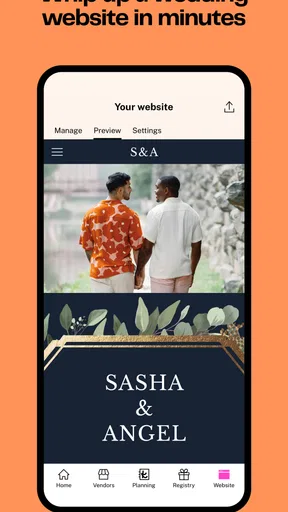
The app is also a practical option for people who want to build a wedding website as part of the planning process. A website can give guests one place to find useful event information, while the planning tools help the couple organize what needs doing behind the scenes. I see the appeal in keeping those tasks associated with the same wedding project, especially for couples who would rather not assemble a system from several unrelated services.
A realistic way to use it during a busy week
Picture a couple who has a venue in mind but still needs to compare vendors and keep spending in check. During a lunch break, one partner can check the next checklist items and note what needs a decision; later, the couple can review vendor options together and compare them against the budget they are trying to follow. If a new question comes up, they can keep a personal note with the relevant planning details instead of relying on memory. The value here is not that an app makes the choice for them; it is that it gives them a more orderly way to pick up the conversation where they left off.
This sort of shared routine is where I think a mobile planner earns its place. Wedding planning often happens in short bursts: a few minutes between errands, a conversation after work, or a quick check when an idea occurs. A phone-based workspace can make those moments productive, provided both partners agree on how they will use it. I would decide early who is responsible for updating a task or note, because information is only helpful when the people planning the wedding trust that it is current.
What to expect from the vendor and guest tools
Vendor discovery is not the same as hiring a coordinator. The search tool can help couples find possible businesses and look at reviews and pricing information, but choosing a vendor still calls for personal research and direct communication. I would compare a few candidates rather than selecting the first appealing result, and I would keep track of the questions that need a clear answer before a booking. That extra step is important because the app can support the search without knowing which service best matches a couple’s individual expectations.
The guest list manager and wedding website also address a different kind of work: keeping guest information and responses organized. Connecting those pieces can be convenient when guests are able to RSVP online, and it may reduce the need to reconcile several separate lists. Couples should still be thoughtful about how they maintain contact details and meal preferences. I would check entries as responses come in and keep important information current, rather than assuming that an online response automatically resolves every planning detail.
Personal notes have a quiet but useful role here. A note about a song idea, a family preference, or a question to raise with a vendor can preserve context that a bare task name would lose. I would keep notes specific and actionable—for example, recording what needs checking and who will follow up—rather than turning every section into a scrapbook of unfiltered ideas. That makes it easier to retrieve the details when decisions are being made together.
Using the app without letting it run the wedding
Planning a wedding can feel like a full-time job, but fortunately, we live in an era where apps like The Knot Wedding Planner are here to save the day. Imagine having your very own digital wedding planner right in your pocket, guiding you every step of the way. Here’s my take on what makes this app a must-have for anyone embarking on their matrimonial journey.
Features That Make Wedding Planning a Breeze
First off, let’s talk about the sheer versatility of The Knot Wedding Planner. This app is packed with features that cater to every aspect of wedding planning. From setting up a personalized wedding website to managing your budget, it’s like having an entire wedding team at your fingertips.
The checklist feature is a lifesaver. It breaks down all the tasks you need to tackle, from booking the venue to sending out thank-you cards. What I love is how you can customize the list to fit your timeline and personal priorities. Plus, the app sends reminders so you don’t miss a beat.
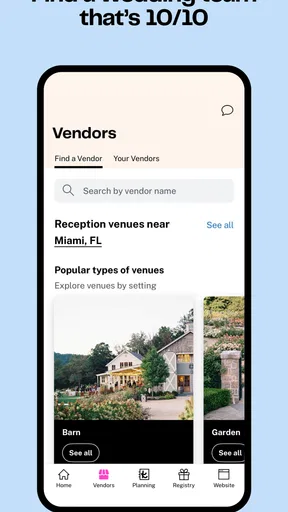
Another standout feature is the vendor search tool. You can browse through a wide array of vendors, complete with reviews and pricing information. It’s like having Yelp specifically for weddings, helping you find the perfect florist or photographer without the usual stress.
Design and Usability
The user interface is both intuitive and aesthetically pleasing. Navigating through the app feels seamless, and the clean design makes it easy on the eyes. You don’t need to be tech-savvy to get the hang of it. Everything is laid out in a straightforward manner, making the planning process feel less overwhelming.
The Knot has also integrated a guest list manager that syncs with your wedding website, allowing guests to RSVP online. This feature alone can save you hours of organizing, and it’s super convenient for tracking meal preferences and contact information.
As with any all-in-one planner, there is a trade-off: putting many types of planning in one place can feel less flexible than using separate tools chosen for each task. A couple who already has a detailed spreadsheet, a preferred budgeting method, or a coordinator’s own workflow may not want to duplicate that work. I would pick one source of truth for essential details and use the app where it genuinely saves effort, rather than maintaining the same information in several places.
It is also worth remembering that a checklist can organize work without deciding what is right for a particular couple. A reminder may help prevent a task from slipping by, but it cannot judge whether a tradition, purchase, or vendor suits the wedding. I find the app most useful when it supports conversations and decisions, not when it is treated as an authority on how a wedding should be planned.
Personal Touches
One thing that sets this app apart is its focus on personalization. You can add personal notes to every section, whether it’s a special song for your playlist or a reminder about Uncle Joe’s nut allergy. It’s the little details that make your wedding unique, and this app helps you keep them all in one place.
For those who love inspiration, the app also offers tons of articles and galleries to spark your creativity. Whether you’re looking for the latest trends in wedding fashion or unique decoration ideas, you’ll find plenty of content to fuel your imagination.
Inspiration is most useful when it leads to a decision the couple can actually make. I would save ideas with a brief note about what appeals to me—perhaps a color combination, a ceremony detail, or a table arrangement—and then compare that idea with the budget and the vendors under consideration. Otherwise, a growing collection of attractive possibilities can create more choices without bringing the plan closer to completion. Turning inspiration into a short list of concrete questions keeps it practical.
Compared with the usual alternatives, this app’s appeal is its wedding-specific mix of organization, vendor discovery, budgeting, and a guest-facing website. A general calendar or notes app can be simpler if all a couple needs is a shared schedule and a place to write ideas. A spreadsheet may suit people who want full control over custom calculations and columns. A human planner is a better fit when the couple wants another person to coordinate decisions and logistics. I would choose the Knot when the convenience of related wedding tools matters more than building a completely custom system.
It is free to use, and its broad reach is reflected in an average rating of 4.8 from around 57,000 ratings, with more than 1 million installs. The app is rated Everyone, so its age rating does not present an adult-only restriction. Those figures can help establish that it is widely used, but they do not tell me whether its workflow will suit every couple. The better test is whether the checklist and connected planning areas fit the way you and your partner already make decisions.
Who benefits most, and when I would choose another approach
I would recommend trying it if you are planning without a dedicated coordinator, want a central place for the main wedding tasks, and expect to use a website and vendor search as part of the process. It is especially suited to couples who appreciate reminders and a clear list of next steps, or who are coordinating between two busy schedules. The Knot, developed by The Knot, has been available since September 28, 2014; version 4.36.0 requires iOS 9 or later. For a reader using a compatible device, the main question is less about technical complexity and more about whether this bundled approach matches their habits.
I would be less likely to rely on it as the main system if one partner wants a highly customized spreadsheet, if a professional planner already manages the details elsewhere, or if the couple simply wants a minimal checklist without the other planning areas. In those cases, adopting another full planning workspace may add an extra layer rather than remove friction. It can still be useful for a specific job, such as browsing vendors, but there is no benefit in moving every detail into an app that does not fit the way the couple works.
Before settling into any planner, I would answer a few practical questions through use: Can both partners keep the checklist current? Does the vendor information help narrow the search, or do you need a separate comparison method? Will guests find the website and RSVP process convenient? And does the budget view support the couple’s own way of tracking spending? Those are more revealing than simply counting features, because they show whether the app fits the actual planning routine.
Final Thoughts
Overall, The Knot Wedding Planner is a fantastic tool for anyone planning a wedding. It combines functionality with personalization, making the entire process less stressful and more enjoyable. If you’re looking to streamline your planning and keep everything organized, this app is definitely worth checking out. Plus, it’s free, which is a huge bonus in the world of wedding planning. So, give it a try and let it guide you down the aisle—stress-free!
My honest recommendation is to start with the checklist and one or two planning areas you already need, then see whether the combined workflow saves time over your existing notes and messages. If it does, the app can become a helpful home base; if it creates duplicate work, keep the parts that help and use a simpler alternative for the rest. That is the difference between a wedding planner that genuinely lightens the load and one that becomes another task to maintain.
Privacy and Permissions
See what permissions an app requests and how it handles your data.
- Contacts
- read your contacts
- Photos/Media/Files
- read the contents of your USB storage, modify or delete the contents of your USB storage
- Storage
- read the contents of your USB storage, modify or delete the contents of your USB storage
- Wi-Fi connection information
- view Wi-Fi connections
- Other
- view network connections, full network access, run at startup, control vibration, prevent device from sleeping, install shortcuts, uninstall shortcuts, read Google service configuration
Verdict
Strengths of The Knot Wedding Planner
- User-friendly interface simplifies planning.
- Comprehensive vendor search feature.
- Customizable checklist keeps tasks organized.
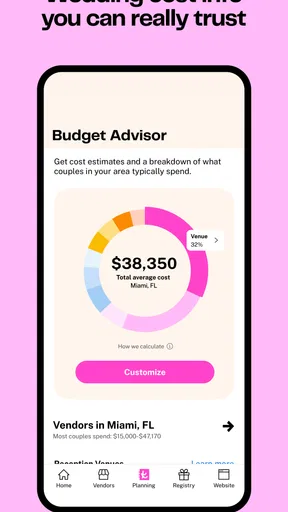
- Budget tracker helps manage expenses.
- Guest list manager with RSVP tracking.
Limitations of The Knot Wedding Planner
- Limited offline functionality.
- Some features require premium subscription.
- Occasional syncing issues with calendar.
- Vendor reviews lack detailed feedback.
- App notifications can be overwhelming.
Similar Picks in This Category
View All
Easy Quran Mp3 Audio Offline
Muslim Worldapp4.7

Invitation Maker: Cards & RSVP
Greetings Island4.9

StubHub - Live Event Tickets
StubHub4.3

Fever: Events & Tickets
Fever Labs4.7

Epic Freebie Games Radar
Arioch Pds - Apps & Games4.4

Invitation card Maker, Design
Splendid App Maker4.9
Frequently Asked Questions
What features does The Knot Wedding Planner app offer?
The Knot Wedding Planner app provides a comprehensive suite of tools to help couples organize their weddings. It includes features like a customizable checklist, budget tracker, and guest list manager. Additionally, it offers vendor recommendations and inspiration galleries to help you plan every detail of your big day with ease.
Is The Knot Wedding Planner app free to use?
Yes, The Knot Wedding Planner app is free to download and use. It offers a wide range of free features, but there may be some premium options or services that require in-app purchases. Most users find the free version comprehensive enough for planning their wedding efficiently.
Can I use The Knot Wedding Planner on multiple devices?
Absolutely! The Knot Wedding Planner app syncs across multiple devices. This means you can access your wedding plans from your phone, tablet, or computer seamlessly. All updates made on one device will automatically reflect on others, ensuring your planning is always up-to-date.
How does The Knot Wedding Planner help with managing a guest list?
The Knot Wedding Planner app offers a robust guest list manager that lets you add, categorize, and track RSVPs. You can organize your guests into groups, monitor who has responded, and even manage meal preferences. It also allows easy export of guest information for further use.
Does The Knot Wedding Planner offer vendor recommendations?
Yes, the app provides curated vendor recommendations based on your location and preferences. It includes reviews and ratings from other users, helping you make informed decisions. You can contact vendors directly through the app, making it a seamless process to find the right services for your wedding.
